Chess on Bettuvo
Classic two-player chess right in your browser, nothing to install. Play the bot on this page, invite a friend with a link or find an opponent with a similar rating in quick play.
Time controls are blitz 3+2 and 5+0 or rapid 10+0: the first number is minutes for the whole game, the second is seconds added after every move. Who plays white is decided by a draw that you can verify after the game.
The bot runs on the Stockfish chess engine with limited strength: the easy level suits beginners, while the hard one will make an experienced player think. Playing the bot is free and does not affect your rating.
Chess rules in brief
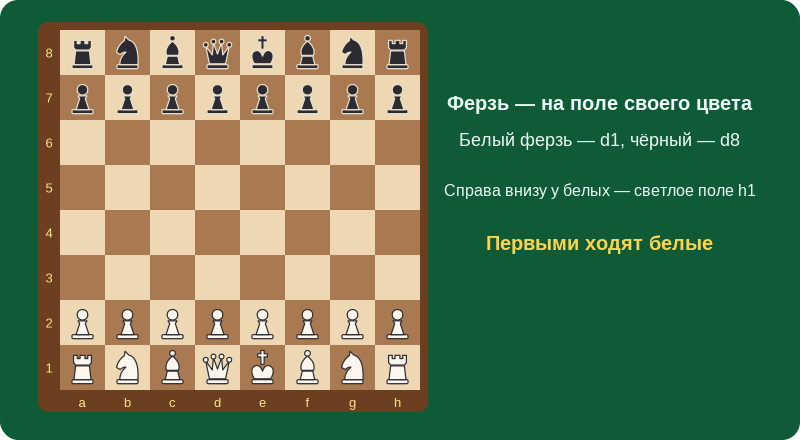
- The king moves one square in any direction.
- The queen moves any number of squares along files, ranks and diagonals.
- The rook moves along files and ranks, the bishop along diagonals.
- The knight moves in an L shape and can jump over pieces.
- A pawn moves one square forward, one or two from its starting square, and captures diagonally forward.
- The goal is checkmate: the king is attacked and cannot escape or be shielded.
Castling, en passant and promotion
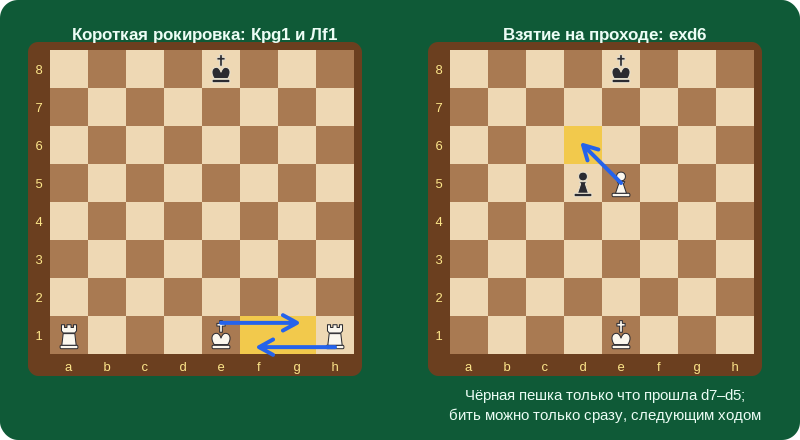
- Castling: the king moves two squares towards a rook and the rook jumps over it. Not allowed if the king or that rook has moved, there are pieces between them, the king is in check or passes through an attacked square.
- En passant: if an enemy pawn advances two squares and lands next to your pawn, you may capture it as if it had moved one square. Only immediately, on the very next move.
- Promotion: a pawn that reaches the last rank becomes a queen, rook, bishop or knight of your choice.
To move, tap a piece and then a square, or drag it. Only legal moves are highlighted, and a piece picker appears when a pawn promotes.
Every kind of draw
- Stalemate: the player to move has no legal move but is not in check.
- Threefold repetition of the same position.
- The fifty-move rule: 50 moves in a row by both sides without captures or pawn moves.
- Insufficient material: neither side has enough pieces to mate (for example, king against king).
- Time runs out, but the opponent has no way to mate — that is a draw, not a loss.
- Draw by agreement: use “Offer a draw” in the menu.
Tips for beginners
- In the opening, take the centre with pawns and develop knights and bishops; do not bring the queen out early.
- Castle within the first 10 moves to keep your king safe.
- Before each move, check that you are not leaving a piece undefended.
- In blitz, watch the clock: a simple move in time beats a perfect one after your flag falls.
FAQ
›Can I play chess without signing up?
Yes, against the bot — right on this page. You need an account to play people, get a rating and join tournaments.
›How strong is the bot?
The bot runs on Stockfish with limited strength: from beginner to a solid club player. You choose the level before the game.
›What does 3+2 mean?
Three minutes for the whole game for each player and two seconds added after every move. Only the clock of the player to move runs.
›What happens if I run out of time?
You lose. But if your opponent has only a king or not enough pieces to mate, the game is a draw.
›How do you fight engine cheating?
After rated games the server compares players’ moves with Stockfish’s choices. Suspiciously accurate play is sent to moderators for review.
›What should I promote a pawn to?
Usually a queen, but you can choose a rook, bishop or knight — for example, to avoid stalemate.
Other games
- Durak online — play for freeThrow-in Durak 1×1 with a 36-card deck. Play a bot with no sign-up and no download.
- Transfer Durak onlineDurak with transfers 1×1: beat the cards or send the attack back. A game against a bot starts right away.
- Backgammon online — play for freeLong and short backgammon 1×1. Choose a variant and start a game against a bot.
- Long backgammon onlineClassic long nardy 1×1 against a bot: three difficulty levels, matches to 1–7 points.
- Short backgammon onlineClassic backgammon 1×1: hit single checkers and bring yours home first.
- Solitaire online — a duel for pointsKlondike for two: the same layout, 5 minutes, the higher score wins.
- Russian checkers onlineClassic 1 vs 1 checkers on an 8×8 board: a bot with three levels, live opponents and a chess clock.